
Klopotek Deployment Services
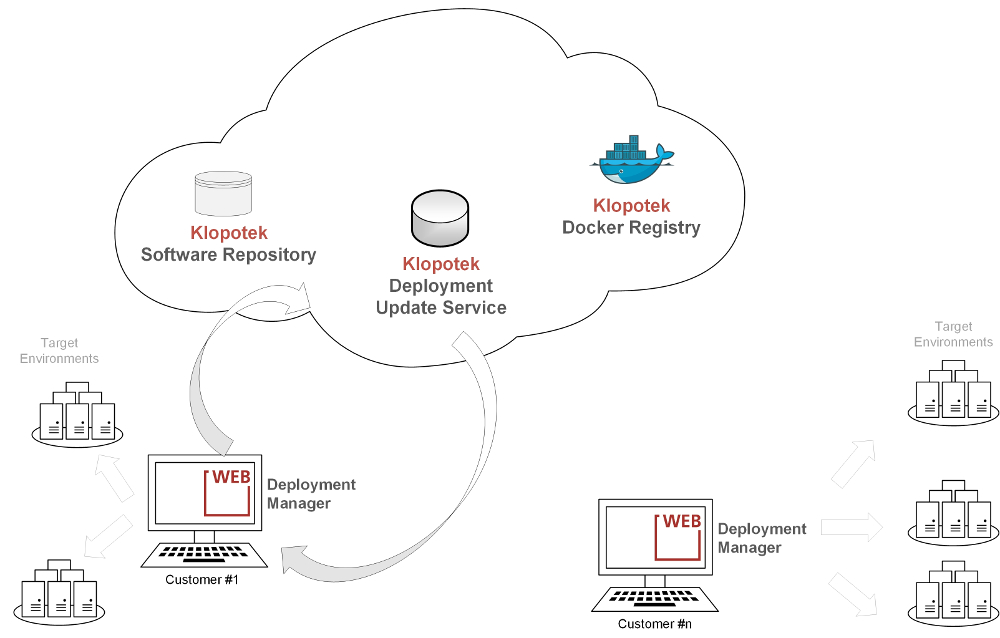
Klopotek Deployment Services is a set of new online services and tools made available by Klopotek which aims to simplify the installation and the upgrade of all the STREAM products.
Klopotek Deployment Manager (KDM)
A tool able to manage the design, the configuration and the automatic deployment of a STREAM Web Application based on the new CORE Architecture.
The KDM tool is distributed by Klopotek as a Linux-based Docker image. Docker is an open-source project that automates the packaging, the distribution and the running of applications inside software containers. With this approach, the user can run this tool on any Operating System supported by Docker, even Windows 10 / 8 / 7, Mac, as well as any GNU/Linux distribution. All the details about this technology can be found on the Docker web site https://www.docker.com/.
If KDM runs on a system able to connect to the target hosts, after a first phase of design of the environments with the detail of hosts, application servers and products, it will allow to manage all the configurations and finally to deploy the software on the desired environment.
Klopotek Software Repository
This online service is the repository where Klopotek periodically releases all the official artifacts and the software components needed by the STREAM applications. This service is directly accessed by the KDM tool in order to retrieve the resources to install.
Klopotek Docker Registry
This online service is responsible for hosting and distributing Klopotek official Docker images. Final users can connect to this service to get the Docker images of the KDM tool.
Klopotek Deployment Update Service
Is the service that allows to notify users, through the KDM tool, about the availability of updates specifically for the KDM tool. The kind of updates are:
- • Catalogs updates: corresponding to minor updates of KDM, i.e. the only metadata
- • Docker images updates, when there is a new version of the KDM tool that has to be used for installing new applications, etc.
The user who wants to install or update the STREAM Applications can follow the main steps summarized below. Official PDF documentation is anyway available, containing detailed descriptions of all the required activities.
- 1. Install Docker CE Community Edition on any workstation able to connect to the target hosts, downloading it from the URL https://www.docker.com/community-edition#/download
- 2. Download the KDM tool distributed through a Docker image from the official Klopotek Docker Registry
- 3. Set a new Oracle database Schema "KDM" and apply the Liquibase scripts found in the Docker image
- 4. Start the Klopotek Deployment Manager application by running the Docker container on that workstation
- 5. Configure the users allowed to access KDM and their roles
- 6. Connect the running instance of the tool to the online Klopotek Deployment Services(Software Repository and Update Service)
- 7. If available, perform a catalog update through KDM
- 8. Design and configure one or more environments intended to host the applications
- 9. Adjust the target servers to allow to be accessed by the tool
- 10. Configure STREAM.Core properties shared between applications and the ones related to the specific STREAM app to be installed
- 11. Launch and monitor the deployment
The tool will automatically download from the online Klopotek Software Repository all the resources needed to install and configure applications. Upgrades of STREAM application and changes on the configuration will always be done through the KDM software. The tool will notify the user about the existence of new STREAM application updates as well as of the tool itself.